

PrismHR has a concept called 'Multi-Entity Groups' that will allow you to organize similar clients. Using PrismHR Multi-Entity Groups gives detamoov the flexibility to update an employee deduction or loan when multiple clients map to a single Retirement Plan.
Creating a Multi-Entity Group in PrismHR
If a Retirement Plan is tied to multiple Clients then you can create a Multi-Entity Group in PrismHR. detamoov can then be configured with the Group Code for the Multi-Entity Group to handle the scenarios mentioned above.
Configuring the PrismHR Web Service User
Important: If there are any client restrictions on the Web Service user, access will be limited only to the Client ID provided in the Client ID field in the moov configuration. To see all clients associated with a Multi-Entity Group, the Web Service User cannot have any client restrictions.
To ensure that your PrismHR Web Service user is set up with the appropriate Allowed Methods, please view the Configuring a Web Service/API user in PrismHR. Make sure all Allowed Methods related to 360 are added to the Web Service User.
Configuring the PrismHR 360 Retirement step
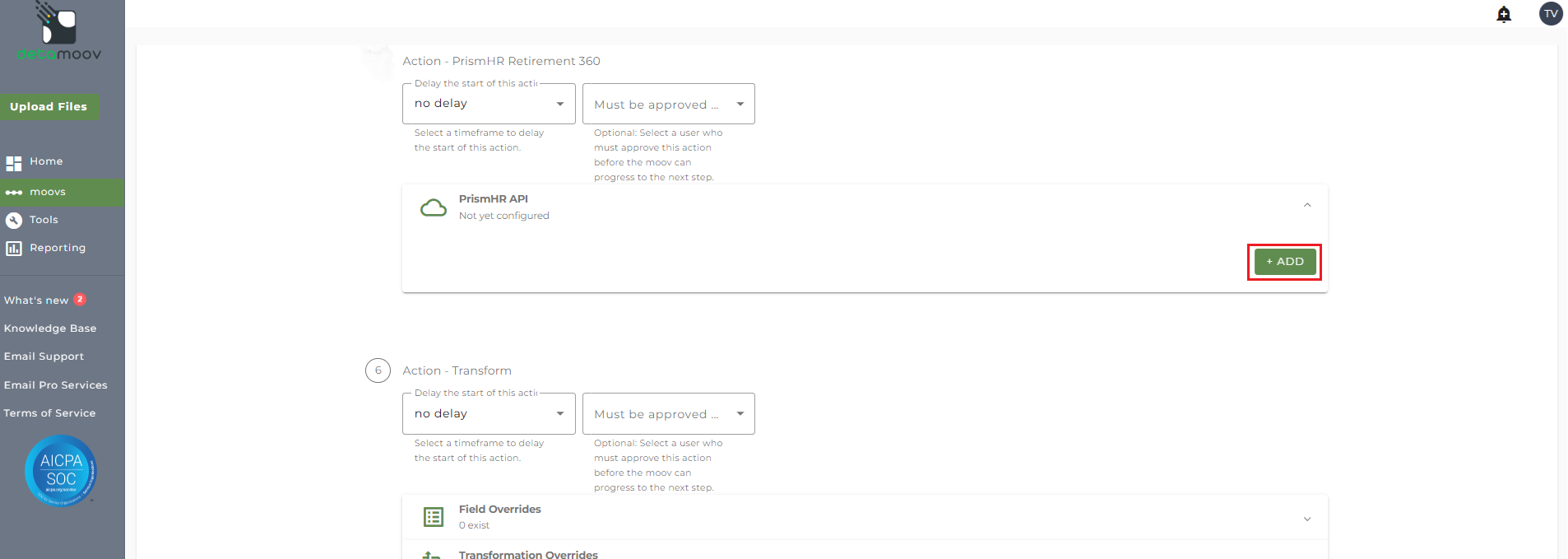
When configuring your client for a PrismHR 360 moov, you will need to add the Multi-Entity Group ID. Locate the PrismHR Retirement 360 step on the moov configuration and expand the PrismHR API panel.
In the PrismHR API Configuration section, select your PrismHR Premier Integration, enter in a Client ID (can be any Client ID in the Multi-Entity Group), and enter the Multi-Entity Group Code.
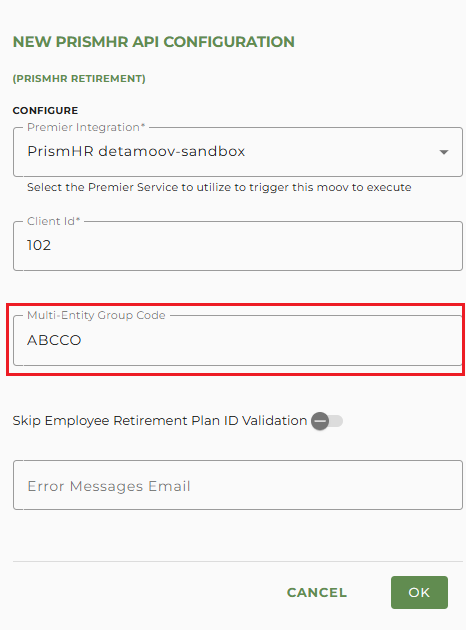
Some records in the feedback file may generate notifications when an update cannot be made to an employee. You can specify a list of email addresses (separated by a comma) in the Error Messages Email field. If left blank, all detamoov users on your account will receive the notifications.
Common Scenarios - Election Details
The following are some scenarios that may occur when attempting to update employee Election Details when the employee exists in multiple clients in the Multi-Entity Group. These scenarios are for when the employee is in two clients, but they apply if the employee is in more than two. They also assume that the employee status is Active unless otherwise noted:
| ClientA Enrollment |
ClientB Enrollment |
Results |
|---|---|---|
| Not Enrolled | Not Enrolled | The employee is automatically enrolled in the Retirement Plan and the Election Details are updated for each client. |
| Eligible Unenrolled | Eligible Unenrolled | The employee is automatically enrolled in the Retirement Plan and the Election Details are updated for each client. |
| Eligible Unenrolled | Not Enrolled |
The employee is automatically enrolled in the Retirement Plan and the Election Details are updated where they are Eligible Unenrolled.
The following message is returned for the clients they are not enrolled:
"Feedback applied to all retirement plan enrollments in a valid status. Employee does exist in some clients of the multi-entity group without a retirement plan enrollment" |
| Eligible Unenrolled | Inactive |
The employee is enrolled in the Retirement Plan and Election Details are updated where they are eligible.
The following message is returned for the inactive enrollment:
"Feedback applied to all retirement plan enrollments in a valid status. Employee does exist in some clients of the multi-entity group without a retirement plan enrollment" |
| Active | Not Enrolled |
The employee Election Details are updated on the client with the Active Enrollment. The following message is returned for the clients they are not enrolled:
"Feedback applied to all retirement plan enrollments in a valid status. Employee does exist in some clients of the multi-entity group without a retirement plan enrollment" |
| Active | Eligible Unenrolled |
The employee is enrolled in the client where they are eligible and Election Details are updated.
Election Details are updated in client where the employee is active. |
| Inactive | Not Enrolled |
No updates are made to the Election Details for any client. The following message is returned:
“Employee retirement plan enrollment found but it's in an inactive or waived status. Unable to determine which client to apply feedback update to” |
|
Active Terminated |
Not Enrolled |
The employee Election Details are updated on the client where they are Terminated with an active Retirement Plan.
The following message is returned for the clients they are not enrolled:
"Feedback applied to all retirement plan enrollments in a valid status. Employee does exist in some clients of the multi-entity group without a retirement plan enrollment" |
|
Inactive Terminated |
Not Enrolled |
No updates are made to the Election Details for any client. The following message is returned:
"Feedback applied to all retirement plan enrollments in a valid status. Employee does exist in some clients of the multi-entity group without a retirement plan enrollment" |
| Active | Active | The employee Election Details are updated on all clients. |
| Inactive | Active |
The employee Election Details are updated on all clients where they have an Active Enrollment.
The following message is returned for the clients where they have Inactive Enrollment:
“Feedback applied to all retirement plan enrollments in a valid status. Feedback not applied to retirement plan enrollments in inactive or waived status” |
| Inactive | Inactive |
No updates are made to the Election Details for any client. The following message is returned:
“Employee retirement plan enrollment found but it's in an inactive or waived status. Unable to determine which client to apply feedback update to” |
Employee is not found in any client within the Multi-Entity Group.
No updates are made to the Election Details for any client. The following message is returned:
“Employee not found in any client within the multi-entity group”
The following are some scenarios that may occur when attempting to update employee Loans when the employee exists in multiple clients in the Multi-Entity Group. These scenarios are for when the employee is in two clients, but they apply if the employee is in more than two. They also assume that the employee status is Active unless otherwise noted:
| ClientA Enrollment |
ClientB Enrollment |
Results |
|---|---|---|
| Not Enrolled | Not Enrolled |
No updates are made to the Loan Details for any client. The following message is returned:
“Unable to create new retirement loan. Employee does not have an active retirement plan in any client tied to this group” |
| Eligible Unenrolled | Eligible Unenrolled |
The employee is not enrolled in any client. The following message is returned:
"Unable to create new retirement loan. Employee has retirement plan enrollments in multiple clients tied to this group"
|
| Eligible Unenrolled | Not Enrolled | The employee is enrolled into the Retirement Plan and Loan Details are updated on the client where they are Eligible. |
| Active | Not Enrolled | The employee Loan Details are updated on client where they have an Active Enrollment. |
| Active | Eligible Unenrolled |
No updates are made to the Loan Details for any client. The following message is returned:
“Unable to create new retirement loan. Employee has retirement plan enrollments in multiple clients tied to this group,” |
| Inactive | Eligible Unenrolled | The employee is enrolled in the Retirement Plan and the Loan Details are updated on the client where the employee is eligible. |
| Inactive | Not Enrolled |
No updates are made to the Loan Details for any client. The following message is returned:
“Unable to create new retirement loan. Employee does not have an active retirement plan in any client tied to this group” |
| Active | Active |
No updates are made to the Loan Details for any client. The following message is returned:
“Unable to create new retirement loan. Employee has retirement plan enrollments in multiple clients tied to this group,” |
| Active | Inactive | The employee Loan Details are updated on client where they have an Active Enrollment. |
|
Active Terminated |
Inactive | The employee Loan Details are updated on client where they have an Active Enrollment. |
|
Inactive Terminated |
Inactive |
No updates are made to the Loan Details for any client. The following message is returned:
“Unable to create new retirement loan. Employee has retirement plan enrollments in multiple clients tied to this group,” |
| Inactive | Inactive |
No updates are made to the Loan Details for any client. The following message is returned:
“Unable to create new retirement loan. Employee has retirement plan enrollments in multiple clients tied to this group,” |
| Active with existing Loan | Inactive | The Loan Details matching the TPA Loan ID in the feedback data are updated. |
| Active with existing Loan | Active | The Loan Details matching the TPA Loan ID in the feedback data are updated. |
| Active with existing Loan | Active with existing Loan |
If the loans have the same TPA Loan ID, the Loan Details matching the TPA Loan ID for the first Client ID returned by the API are updated.
If the loans have different TPA Loan IDs, the Loan Details will be updated on each loan matching the TPA Loan ID. |
Employee is not found in any client within the Multi-Entity Group.
No updates are made to the Loan Details for any client. The following message is returned:
“Employee not found in any client within the multi-entity group”

